

Select Your QR Code
URL QR Code Generator
QR Code Name
Preview
Create QR Code
in 3 StepsMake a QR code in the blink of an eye using a QR Code Generator.
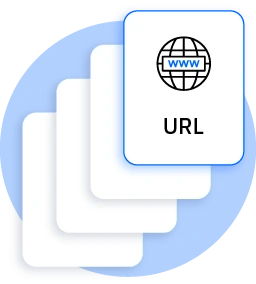
Choose the Content
In a free QR code maker, you will get an option to choose your content from URL, Vcard, Text, E-mail, Wi-Fi, etc.
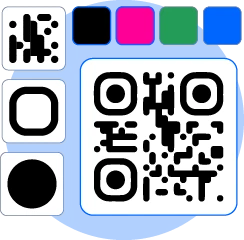
Customize Your QR Code
After choosing your content, you can customize your QR code. Choose the frame, shape and color or use your logo as QR.
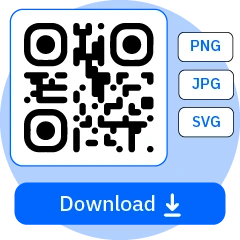
Download Your QR Code
Once your QR is all set, you can download it in JPG or print quality- SVG.
What is a QR Code?
QR Code (Quick Responsive Code) is a digital Shortcut, a two-dimensional code in a black-and-white square pattern that carries information. You just need to scan it with your phone to access the information, website quickly, details about products or whatever information it holds.
It’s handy for everything from shopping to keeping track of information, all in one snap. It is often used in marketing, advertising, promotions, payments, travel and tourism, etc. It is the most convenient way to store the information in just a single square and access data with a single scan. It’s time to create a QR code using a free QR code generator.

What Are the Benefits of Using QR Codes?
QR codes are loaded with amazing benefits, have a look!
- Easy to use, a simple scan with a smartphone
- It is efficient and allows quick access to information
- It is versatile and can be used in any field from payments to marketing
- QR Codes are quite cost-effective
- It rules out physical contact, perfect for hygiene or safety measures
- Allows tracking of interactions and user engagement
- Easily accessible and can store large pieces of information in a compact format
- It secures and supports encryption to safeguard transactions and data
What Are the Benefits of Using a QR Code Generator?
QR code maker comes up with various benefits such as,
- It's easy to create a QR code in a few seconds without technical expertise.
- You can generate QR codes for URLs, PDFs, MP3s or anything you want with this quick tool.
- You can use QR code creator for free.
- Allows customization with various options for format, logo, shape or color.
- QR generated by free QR code creators are quite responsive and readable across different devices and screens.


What is Static and Dynamic QR Code?
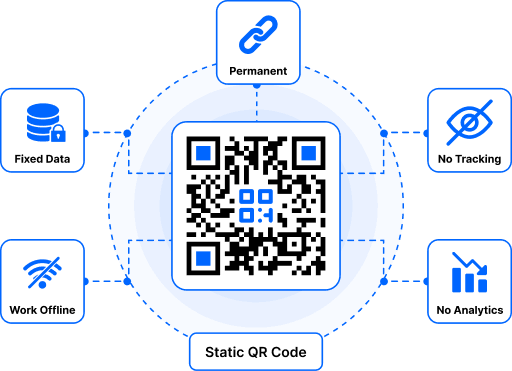
Static QR Code- You can update the content later, but you will have to reprint the QR Code. Scan tracking is not available.
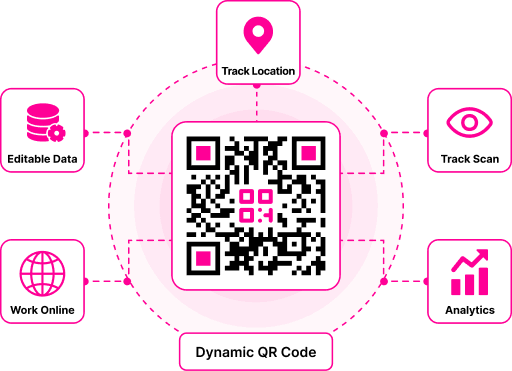
Dynamic QR Code- You can update your QR Code content anytime without changing or reprinting the QR Code. Track scans, monitor performance, and manage campaigns with ease.
Difference Between Static and Dynamic QR Codes
Static and Dynamic QR Codes may look the same, but they have different features and flexibility.
Static QR Codes
Static QR Codes are permanent and simple. They're usually free and work well for basic sharing.
Static QR Codes Are Perfect for -
- Perfect for one-time or simple sharing
- No scan tracking and analytics not available
- Password protection isn't supported
- Large amounts of data can slow down the scan
- Retargeting and A/B testing are not available
- No scan limits
Commonly Used For -
- Personal use
- WiFi sharing
- Password protection isn't supported
- Contact information
- Website links
Dynamic QR Codes
Dynamic QR Codes are more advanced and perfect for businesses, campaigns, and marketing
Dynamic QR Codes Are Perfect for -
- Faster and offers more advanced features
- Scan tracking and analytics are available
- Easily track scan count, location, device, and more
- Scan limits depend on your selected plan
- You can pause or resume QR Codes
- Password protection is supported
- Retargeting and A/B testing are available
- Large content is handled more efficiently
- More flexible for businesses and marketing campaigns
Commonly Used For -
- Product campaigns
- Business analytics
- Marketing campaigns
- Restaurant menus
- Brand promotions
- Customer engagement campaigns
- Inventory management
Explore More QR Code Generators
URL QR Code
vCard QR Code
Text to QR Code
Wi-Fi QR Code
Email QR Code
Phone Number QR Code
Message QR Code
Social Media QR Code
YouTube QR Code
Spotify QR Code
Google Review QR Code
Google Form QR Code
WhatsApp QR Code
Snapchat QR Code
Facebook QR Code
Instagram QR Code
TikTok QR Code
LinkedIn QR Code
Video to QR Code
PDF to QR Code
Image QR Code
Location QR Code
Event QR Code
Calendar QR Code
Zoom Meeting QR Code
Google Meet QR Code
Crypto Payment QR Code
File QR Code
Audio QR Code
Google Sheets QR Code
Google Docs QR Code
Excel QR Code
PNG QR Code
Dropbox QR Code
Etsy QR Code
iTunes QR Code
PPTX QR Code
PayPal QR Code
QR Code Generator FAQs
Are QR Codes Free?
Yes, you can generate QR codes for free using our QR code creator.
What Are QR Codes Used for?
QR codes are used in various places such as for marketing, advertising, promotions, payments, travel and tourism, forms, restaurants, business cards, payments, education etc.
Can I Use the Created QR Codes for Commercial Purposes?
Yes, you can use generated QR Codes for commercial purposes such as campaigns, product information, promotions, customer engagement, advertisements etc.
What Kind of Information Can Be Stored in a QR Code?
QR Codes can store various pieces of information such as URLs, Text, images, MP3, phone numbers, email, menus, event details, location, SMS, business details, etc.
Can I Track QR Code Scans With Dynamic QR Codes?
Yes, Dynamic QR codes let you track the total scans, devices, locations, and dates with the analytics.
Can I Create a Free Dynamic QR Code?
Absolutely. You can create free Dynamic QR codes effortlessly with QRCodeChamp. Some advanced features may need a premium plan.
Are There Scan Limits on Dynamic QR Codes?
Our website offers an unlimited scan limit on Dynamic QR Codes for free.
Do Dynamic QR Codes Expire?
No, dynamic QR Codes remain active as long as your account is active or until you delete the QR code.
Why Should I Use a Dynamic QR Code Instead of a Static QR Code?
Dynamic QR Codes are perfect for marketing and businesses, as you can edit them anytime, and allow you to track the scans and offer analytics without the need to reprint the code, which is more convenient.
Is It Possible to Count the QR Code Scans (Tracking, Analytics, Measuring)?
Yes, with the dynamic QR Code, it is possible to count the QR Code scans and track analytics.
How Long Are QR Codes Valid? Do They Expire?
No, QR codes do not come with an expiration date. A quick link is generated with every QR code to keep it active. They will continue to work as long as the quick link remains functional.
How Do I Manage QR Codes With a QR Code Generator?
You do not need any technical knowledge to use a QR code generator. Choose your content, edit your QR Code as per your requirements and download it in a few seconds.
Can a QR Code Be Edited/Changed?
Not every QR Code is editable or changeable. However, you can edit or change the dynamic QR codes as they are flexible and trackable.
Is It Possible to Create Different QR Codes for the Same Content?
Yes, it is possible to have multiple QR codes that contain the same content or URL. Each QR has a unique graphical representation of the encoded data but can maintain identical information.
Are QR Codes Legally Protected? What is the Licensing Policy?
QR codes are free to use and generated without needing a license. However, the content they use in the QR must be legally compliant and respect intellectual property rights. Besides this, the barcodes and QR codes are protected under the trademark law.
Is QR Code Generator Saving My Data?
QR code generators usually do not store personal information without consent. The code is generated directly in the image form of the browser without using or storing data in a remote system.
Can I Make a QR Code on My Mobile Device?
Yes, you can make a QR code on your mobile device using our QR Code maker.
Can I Generate a QR Code for a Link?
Yes, you can create a QR Code for a link by simply entering it into our generator.
Is the QR Code Generator Safe?
Yes, the QR Code generator is safe to use. They do not collect, transmit or save the data you encode.
Can I Create an Account to Generate Free QR Codes?
With our QR Generator, you do not need to juggle with sign-in and register things.
What Should I Know Before Printing My QR Code?
Before printing your QR Code, check its size for scanning and test the link to the intended content. You must choose a visible location and ensure that scanning is not obstructed by any surroundings.
Do QR Codes Have to Be Generated in Black and White?
Well no, QR codes are not mandatory to be appeared in black and white. They can be generated in various colors. But make sure to choose the perfect contract between the code and background for reliable scanning.
Get Started With QRCodeChamp
Try QRCodeChamp for free, and explore all the tools and services you need to start, run, and grow your business.
Create QR Code